Tired of Kahoot? Top 10 quiz apps
Jan 26, 2026
•
10 min
•
Jul 20, 2026

Written by: Alans Romanovs
Job Title•Marketing Specialist @ Chili Labs
Looking for the best Kahoot alternatives in 2026? Chili Labs reviews top quiz and polling apps like Blooket, Quizizz, and Slido, comparing features, engagement potential, and use cases.
Based on our mobile app and UX expertise, we help you choose the right interactive platform for classrooms, events, or business meetings.
Do you remember the early 2020s? That was when gamification entered boardrooms, and Zoom fatigue was a new diagnosis. Fast forward to 2026, and the landscape has changed. Quiz apps have moved past pure entertainment. They’ve become tools for education, information gathering, and productivity improvement.
Kahoot! taught us that learning didn't have to be boring. But let’s be honest: in 2026, the one-size-fits-all approach doesn't cut it. The market is filled by specialized tools that offer better integrations, sharper UX, and more targeted features.
To gather a list of similar games like Kahoot, we’ve analyzed the current market leaders to understand what makes them tick. From a UX/UI design and feature standpoint, here are the 10 apps that are actually pushing the industry forward this year.
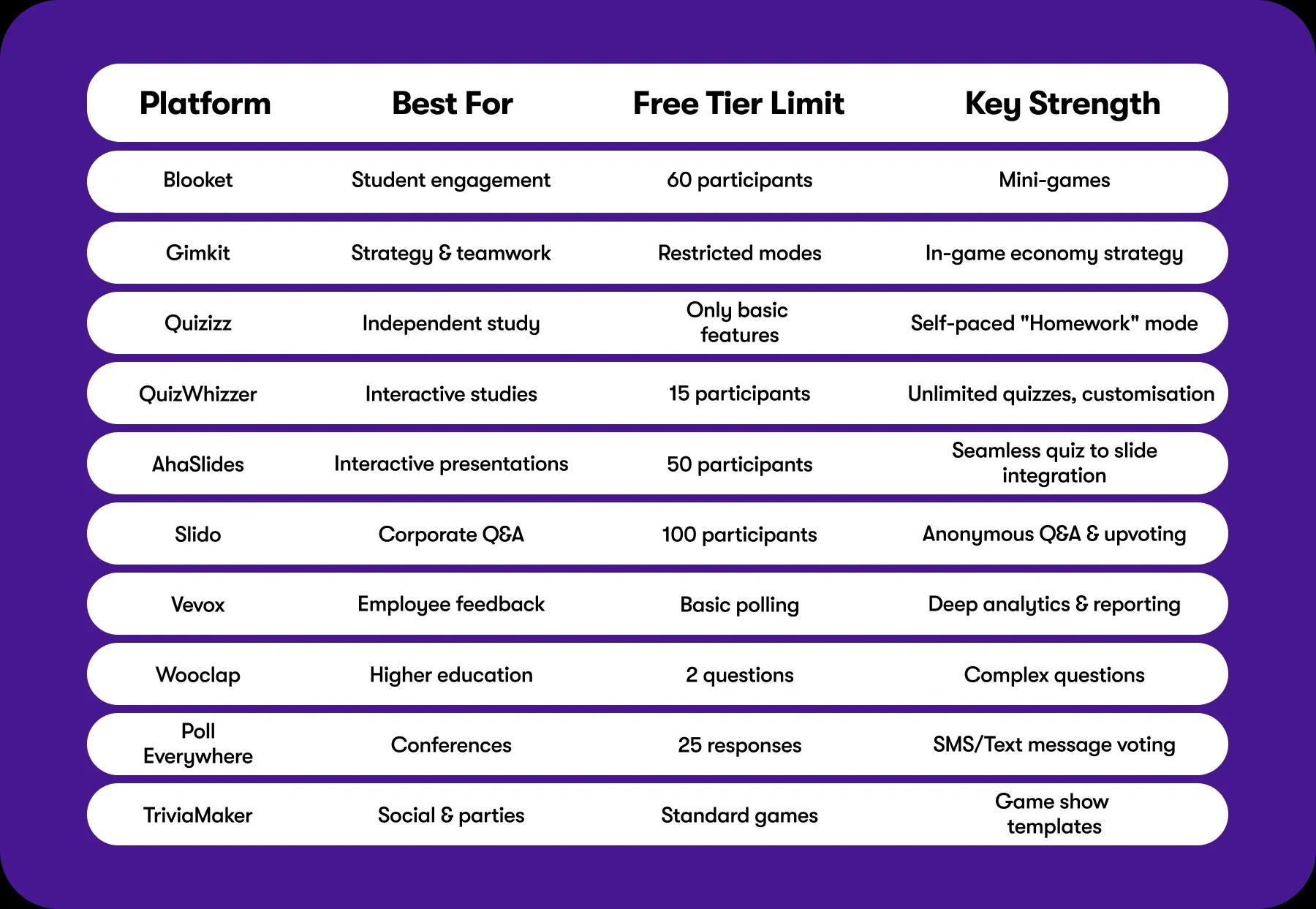
The "TL;DR" Comparison
Gamified Kahoot! alternatives
Great options if you are looking for something that feels less like a test and more like a break.
 1. Blooket
Blooket has taken the concept of a quiz and wrapped it inside mini-games. Instead of answering questions, students are defending towers, collecting gold, or racing. It’s effective because the "quiz" part feels like the price of admission to play the game.
Why it works: It’s genuinely entertaining. Frequent rewards keep players engaged, and tying gameplay to correct answers creates a sense of momentum traditional quizzes don’t have.
The Downside: From a UX perspective, it can be noisy. The game mechanics are so dominant that they risk overshadowing the educational content, depending on the user's focus.
 2. Gimkit
Gimkit does something really clever: it introduces strategy. Users earn in-game currency to buy upgrades and power-ups. It’s a smart pivot that rewards strategic thinking and consistency rather than just reaction speed.
Why it works: The "KitCollab" mode is fantastic. It lets the group build the quiz together in real-time, turning content creation into a shared activity.
The Downside: the monetization model is aggressive. The free tier feels significantly restricted, locking the most engaging game modes behind a paywall.
 3.
3. Teacher-first service that has settled into a comfortable role as the reliable, go-to option for homework and independent study. By 2026, their AI features have gotten really good. You can pretty much upload a PDF and have a quiz ready in seconds.
Why it works: It’s great for self-paced work. Unlike Kahoot, where everyone stares at one screen, Quizizz lets users go at their own speed on their own devices.
The Downside: It lacks the live energy of the others. It’s better for "finish this by Friday" assignments than "let’s do this right now."
 4. QuizWhizzer
QuizWhizzer turns quizzes into races. Students can play at their own pace or together as a class, with each correct answer moving them along a custom game board.
Teachers can create themed boards to match the lesson, making revision feel more like a game than a worksheet.
Why it works: It adds competition without relying on a simple leaderboard. Power-ups keep games competitive so it's not always the same top students winning, and custom game boards make quizzes feel fresh.
The downside: It's designed to balance engagement with learning rather than maximise chaos and entertainment. If you're looking for lots of mini-games and game modes, other platforms may have more variety.
Professional apps like Kahoot!
Bringing a cartoonish game into a board meeting usually doesn't land well. These tools are built for professional environments and structured data collection.
 5. AhaSlides
If you’re tired of switching between PowerPoint and a quiz app, AhaSlides is the answer. It builds the interactivity directly into your slide deck. It feels seamless, which is crucial when you’re trying to keep a presentation moving.
Why it works: It’s flexible. You can do word clouds, polls, and quizzes without breaking the flow of your talk. It’s also generally cheaper than the big enterprise tools.
The Downside: There is a bit of a learning curve. Since you’re essentially building your presentation inside their tool, you have to get used to their interface.
 6. Slido
Slido integrates perfectly with Zoom, Teams, and Webex. It’s less about "quizzing" and more about conversation: Q&A, polling, and upvoting the best questions.
Why it works: The anonymous Q&A feature is gold. It’s the best way to get honest feedback from a team that might be too shy to speak up on a call.
The Downside: It’s strictly business. It’s clean and functional, but it’s not going to get anyone’s heart racing.
 7. Vevox
Vevox positions itself as the "serious" choice, often targeting the compliance and higher-ed sectors. The UI is reminiscent of Microsoft’s ecosystem, signaling professionalism over entertainment.
Why it works: Vevox allows you to create a quiz effortlessly and to create a dynamic learning environment that students will remember. It balances this ease of use with deep backend analytics for the administrators.
The Downside: The interface is very dry. It looks like enterprise software, for better or worse.
 8. Wooclap
This one is huge in the academic world, especially in Europe. Wooclap is backed by neuroeducation. It offers question types that go beyond A/B/C/D, like labeling diagrams or sorting items.
Why it works: It’s versatile. If you are teaching a complex subject like biology or engineering, simple multiple-choice questions often aren't enough. Wooclap handles the complexity well.
The Downside: It takes longer to set up. Because the question types are more complex, you can’t just whip one up in 30 seconds.
The Niche Players
 9.
9. Poll Everywhere has been around forever, and it’s still here for one main reason: reliability. It was one of the first to allow voting via SMS (text message), which is a lifesaver at huge conferences where the Wi-Fi inevitably crashes.
Why it works: It scales incredibly well. You can have thousands of people voting at once without the system blinking.
The Downside: It feels a bit dated compared to the slick UI of AhaSlides or Slido.
 10. TriviaMaker
If you do want to run a fun Friday night social, TriviaMaker is the way to go. It lets you build games that look like TV shows.
Why it works: It creates an atmosphere. With the sound effects and the grid layouts, it really feels like a game show.
The Downside: The mobile experience has room for optimization. It works best when you have a host casting to a big screen and people shouting out answers, rather than quiet individual play.
So, which one should you pick?
As far as we can see, there is no single go-to solution. Rather than searching for a perfect app, focus on choosing the right one for the context. The right tool in the right environment often works best.
- For the classroom: Blooket wins on engagement, Quizizz wins on ease of use.
- For the meeting: Slido keeps it professional, AhaSlides makes it interactive.
- For the social: TriviaMaker is just plain fun.
Building the Next Big Thing
 We spend a lot of time analysing these apps because, ultimately, building digital products is what we do. As a mobile app development company, we have worked with a wide variety of products throughout the years. And education services with elements of gamification are no exception. We understand the specific mechanics that make a user stay and come back for more.
If you’ve looked through this list and still feel like something is missing, or if you have a vision for a tool that does it better, we should talk. Contact us, let’s bring your idea to life.
Similar articles
Discover more with our related articles section. Stay informed about mobile app development, event organizing, and more.
AI buzzwords for beginners - terminology cheat sheet
Were you ever confused by the terminology in a conversation about AI? Felt lost after hearing words like “LLM,” “hallucination,”...
Top 5 Apps Like Duolingo in 2026
Have you ever wondered if there are other apps that can fit you better than Duolingo?!...